Paper Clips and Push Pin Sticker Design: A Playful Office Supply Cluster
In the world of graphic design, the small details often make the biggest impact. Whether you're crafting a brand identity, designing marketing materials, or personalizing your planner, the right visual element can elevate a project from ordinary to memorable. The Paper Clips and Push Pin Sticker Design is one such element—a versatile, playful graphic asset that brings a touch of organized charm to a wide range of creative work. It's not just a sticker; it's a toolkit for injecting personality into your designs.
Deconstructing the Design: More Than Just Office Supplies
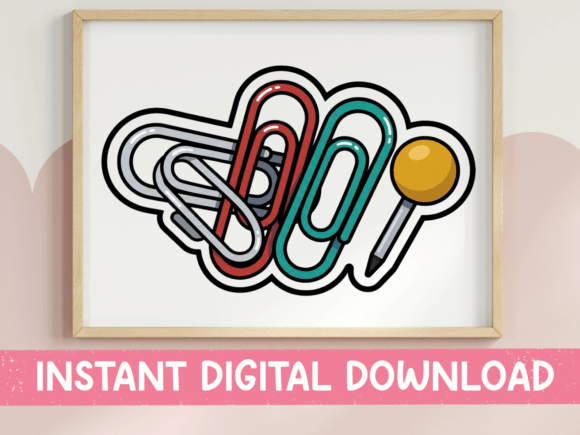
At first glance, the design is a simple cluster of familiar office tools. Look closer, and you'll see a thoughtfully composed illustration with real graphic appeal. Three overlapping paper clips in silver, red, and teal create a dynamic focal point, their colors providing a controlled pop against any background. A yellow-headed push pin anchors the composition, while a gray pencil tip adds a finishing touch of utilitarian detail. Every element is rendered with bold black outlines and flat color fills, giving the entire piece a clean, modern, and graphic style. This isn't a photorealistic rendering; it's a stylized interpretation that feels friendly, approachable, and intentionally designed.
This aesthetic choice is crucial. The flat, outlined style ensures the design remains crisp and legible at various sizes, from a tiny planner sticker to a large-scale poster. The personality is one of cheerful productivity and creative organization. It speaks to anyone who loves the tactile satisfaction of a well-arranged desk, making it particularly resonant for audiences like designers, entrepreneurs, and content creators who live by their to-do lists and brainstorming sessions.
Practical Applications: Where This Graphic Shines
The true strength of the Paper Clips and Push Pin Sticker Design lies in its versatility. As an included SVG file, it's fully scalable for use with cutting machines like Cricut and Silhouette, making it perfect for creating custom vinyl decals for laptops, water bottles, or studio windows. The PNG file, with its high-resolution transparent background, is ready for digital design and sublimation printing. This dual-format approach makes it a robust piece of your design assets library.
Consider its use in these real-world scenarios:
- Branding & Marketing: For a virtual assistant, co-working space, or productivity app, this graphic can become a subtle part of the brand identity. Use it as a favicon, a social media profile icon, or a decorative element on a website to reinforce a theme of helpful organization.
- Publishing & Editorial Design: In a newsletter or blog focused on business tips or creative processes, the sticker can act as a whimsical pull-quote decoration or a section divider in editorial design, adding visual interest without distracting from the text.
- Packaging & Product Design: For a stationery brand or a seller of desk accessories, incorporating this design onto packaging design, thank-you cards, or product labels creates immediate thematic cohesion and a professional, curated look.
- Personal & Digital Projects: The most direct use is on planner covers, notebook stickers, and gift tags for organization-themed presents. It’s a instant way to personalize your digital planners in GoodNotes or Notability, or to create physical stickers for your own use or to sell.
Its utility extends to social media graphics and web design. Imagine it as a playful "pin this!" icon in a blog post or a decorative element in an Instagram story promoting a new organizational tool. The design's clarity ensures it reads well even as a small thumbnail.
Integrating the Asset: A Designer's Perspective
When you introduce a graphic like the Paper Clips and Push Pin Sticker Design into a project, you're doing more than adding an image; you're making a stylistic statement. Its bold outlines and flat colors align with current modern typography and design trends that favor clean, vector-friendly graphics. This makes it an excellent companion to a range of typefaces.
For a cohesive look, pair it with a clean sans serif font like Helvetica or Futura for body text, letting the graphic's playful shapes provide the accent. If your brand has a more traditional or editorial feel, a crisp serif font like Garamond or Caslon can create a sophisticated contrast with the sticker's whimsy. The key is to let the graphic inform your font pairing choices, ensuring the overall aesthetic remains balanced. It works less well with overly ornate script fonts or highly detailed handwritten fonts, which could compete for attention and reduce overall readability.
From a practical standpoint, always consider the context. Test the SVG at different scales in your logo design mockups to ensure the details hold. Check the PNG against various color backgrounds to maintain contrast and visibility. While the download is instant—no shipping, just immediate creation—taking a moment to evaluate fit ensures the asset enhances rather than clutters your work. Remember, colors can vary slightly between screens and printers, so a quick test print is wise for physical projects.
Ultimately, the Paper Clips and Push Pin Sticker Design is a fantastic example of a creative font in graphic form—a commercial font for the visual side of your projects. It offers a quick, effective way to add thematic consistency, professional polish, and a dose of friendly personality to your work, proving that sometimes the most effective design tools are the ones that feel the most familiar.